Lyn
The AI assistant built into every Streamlyne product
Lyn is in everything Streamlyne makes. In FundFit, anything you can do by hand you can do by asking. In Streamlyne Research it drafts the first budget and redlines agreements, and it shows its reasoning either way: which parts of a profile made a match, which sponsor rules shaped a budget, which policy a redline came from.
In FundFit
Everything FundFit does, you can ask Lyn to do
Every FundFit subscription includes Lyn, and every screen in FundFit has a question that does the same job. Search the catalogue, read why a match scored what it scored, set an alert, or find the collaborators a proposal needs by typing the question the way you would ask a colleague. The answer arrives with the reasoning behind it.
Funding, found
Describe the work, the amount, and the deadline, and Lyn searches federal, foundation, and corporate opportunities against the researcher's own profile, with eligibility screened for your institution.
Matches, explained
Ask why an opportunity scored what it scored and Lyn points at the parts of the profile that produced the score, so the reasoning goes to the PI with the match.
Alerts, set in a sentence
Tell Lyn what to watch for and it sets the notification, so new matches arrive without anyone running the search again.
Teams, suggested
Ask who should be on the proposal and Lyn suggests collaborators from your institution's own researcher profiles.
Start with a question

Funding, found

Matches, explained

In Streamlyne Research
Budgets drafted, agreements redlined, questions answered in place
The same Lyn is built into Streamlyne Research, where it is the AI behind budgeting and contract review. It drafts the budget from the justification and the sponsor's rules, redlines an incoming agreement against your own policies, and answers questions inside whichever module you have open.
Budgets, drafted
Lyn builds the first budget from the justification and the sponsor's rules, so a complex first version takes minutes instead of an afternoon in spreadsheets.
Agreements, redlined against your own policies
Lyn reads an incoming agreement, marks the clauses that conflict with your institution's positions, proposes replacement language, and cites the policy it reasoned from. The reviewer checks a citation instead of taking a machine's word for it.
Questions, answered in place
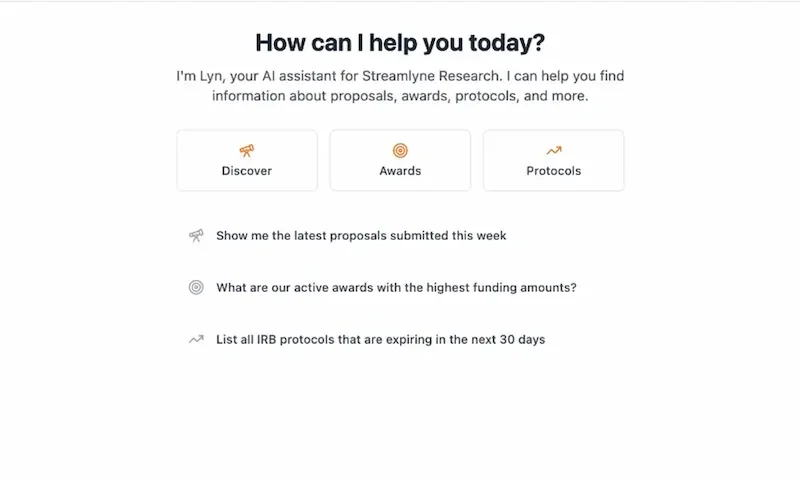
Which submissions are due next week, what changed on an award, where a protocol is sitting: ask inside the module you are in and the answer comes back there.
Questions, answered in place
Agreements, redlined against your own policies
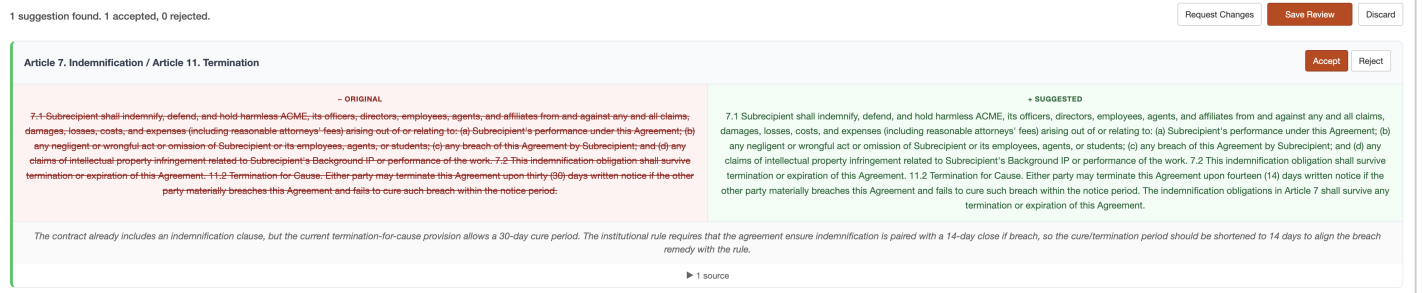
A suggestion you cannot trace is a suggestion you have to redo by hand, which is why each redline cites the policy it came from.
Lyn Pro has been very helpful in the drafting of acceptable contract clauses related to EAR and ITAR. Also, Lyn Pro was a huge help in double checking the compliance requirements for one of our proposals; it helped me catch the absence of an OLAW certificate!
 Andrew Stanger-LauterbachOffice of Contracts and Grants ManagementMedStar Health Research Institute
Your data
Lyn works inside your permission model
It sees only what the signed-in user can see, and every action it takes is logged and reviewable. Zero data retention is enabled with our AI providers: your data is never stored by the model and never used for training.
Read how we handle security →Questions
Before you bring it to your office
Is Lyn a separate product?
No. Lyn is included in every FundFit subscription and built into the Streamlyne Research modules. There is nothing extra to install, and your staff use it inside the screens they already work in.
Where does Lyn show up in Streamlyne Research?
Budget drafting in proposal development, agreement redlining in negotiations, and plain-language questions in every module. Lyn does those three things and does not claim the rest of the lifecycle.
How does Lyn handle sensitive data?
Lyn works inside your permission model. It sees only what the signed-in user can see, and every action it takes is logged and reviewable. Zero data retention is enabled with our AI providers: your data is never stored by the model and never used for training.